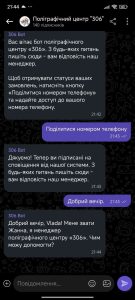


How to connect the Viber bot
Our Viber bot is a convenient way to contact the 306 printing center:
- ask any questions – our managers reply to you, not an automated system;
- get notifications when the status of your orders changes.
Unlike the Telegram bot, the Viber bot can only be set up on a phone. Open the link on the contacts page or find the bot in the list of available bots.
Installation
-
-
The link opens the Viber app (it must be installed). Press «Поділитися номером телефону» (Share phone number).
The number is needed for order notifications. You can message a manager without it, but with your number it is easier for the manager to find you in our system if you have contacted us before.
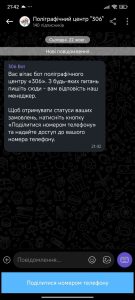
-
In the dialog, press the button that allows sharing your number.
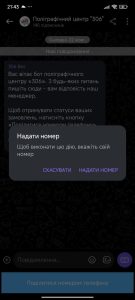
-
You will get a message telling you whether the bot was linked to your account.
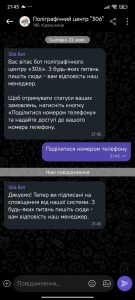
-
Done! You will now get notifications about your order statuses, and you can message us right in this chat.
How to message a manager
Just send a message in the chat with the bot. A manager of the printing center will receive it and reply to you right there, in Viber.
- You can send not only text but also photos and files, for example a print layout.
- Managers reply during business hours: Mon–Fri, 9:00–18:00. Messages sent at other times are answered on the next business day.
- Started a conversation in the chat on our website? You can continue it here: in the website chat, press «Отримати відповідь у Viber» (Get a reply in Viber), then send the bot any message. After that, the whole conversation, together with the manager’s further replies, will be in Viber.